
To check your own recent Instagram following, open your profile → Following and look for “Date followed: latest.” If that option is missing, sort the following list in your own data export. Someone else's list is a different case: a name near the top is not proof of a recent follow.
First, choose the right list
“Following” means accounts you follow. “Followers” means people who follow you. Mixing them up answers the opposite question.
| Your question | What to check | What it can establish |
|---|---|---|
| Who did I recently follow? | Your Following list, sorted by date when available | Order of the recorded relationships |
| Who recently followed me? | Your Followers lists from two dates | Accounts added between those snapshots |
| Who did someone else recently follow? | Records that person chooses to share | Only what those records actually contain |
For incoming followers, use our recent followers guide. This article covers Instagram recent following: the accounts you follow.
Check your own recent follows in the app
- Open Instagram and go to your profile.
- Tap Following, rather than Followers.
- Look for the sort control beside the list. If available, choose Date followed: latest; “earliest” reverses the order.
- Find the account you wanted to revisit and open its profile to confirm the username.
Menu labels and available controls can vary. If you cannot find the sort option, use the export method below. Do not substitute the Following feed: Meta describes that as posts in chronological order, which is a different timeline.
Use your export when the sort option is missing
Meta provides information downloads through Accounts Center. Request your Instagram followers and following, choose All time, and keep the ZIP intact. Our export guide shows the settings.
Open the ZIP in Unfollow Checker, choose Instagram, select Following, then Newest first. A manual check does not require an Instagram password or a Unfollow Checker account; the ZIP is read in your browser.
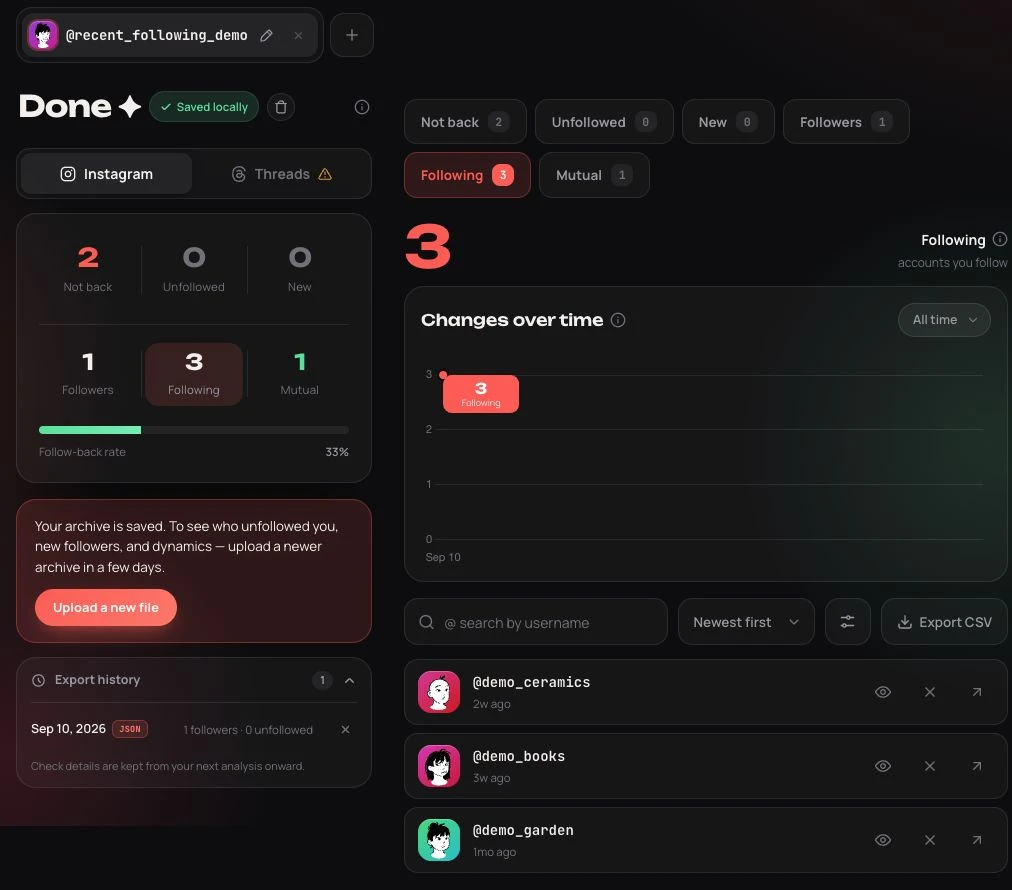
Real product screenshot using synthetic teaching data; English interface. The archive contains three following entries and one follower.
This sorts timestamps present in the file. It does not reveal follows made after Meta prepared the archive. Missing or equal timestamps cannot provide a precise order, and the dates are not an unfollow history.
Try it with three accounts
Download our practice ZIP and open it in a separate browser profile, signed out, so it stays apart from your own saved checks. All names and dates below are invented.
| Account | Example follow date, UTC | Position with Newest first |
|---|---|---|
| demo_ceramics | 8 September 2026 | First |
| demo_books | 1 September 2026 | Second |
| demo_garden | 20 August 2026 | Third |
Now change Newest first to Oldest first. The same three accounts appear in reverse order; no relationships have changed. This is why moving up a list and becoming a new follow are not equivalent.
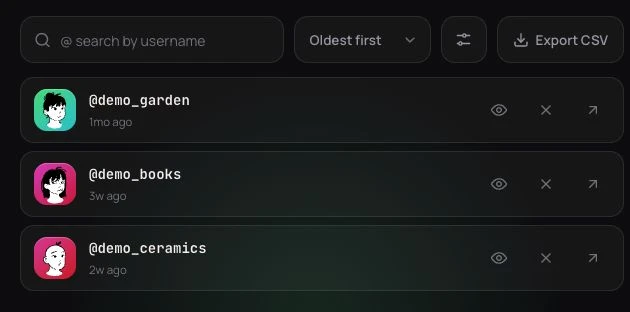
Same practice archive, reversed sorting. Relative date labels depend on the day you open it.
If your real list looks incomplete, check the profile and export range before interpreting it. “All time” avoids deliberately excluding older relationships; it does not turn one snapshot into a complete activity log.
Can you see who someone else recently followed?
Do not treat another profile's default list order as a timestamp. A screenshot of today's list cannot tell you who was added yesterday. Even two complete lists only show differences between observations; a follow and unfollow between them can disappear from both.
Unfollow Checker works with files you provide. It cannot retrieve another person's private export from a username. For a shared project, ask the account owner to review their own list or share the relevant result, rather than their whole archive.
Before paying for an Instagram following viewer, check whether it dates the follow itself or merely the day its system first noticed an account. Those are different claims. A “no login” label alone does not verify accuracy.
Frequently asked questions (FAQ)
Does the first account in Following mean the newest follow?
Only when the list has an explicit date-based sort and the underlying dates support that order. Default order alone is insufficient evidence.
Can one export show everyone I used to follow?
No. It shows the relationships included in that export. It cannot reconstruct accounts you followed and removed before the snapshot.
Does a recent follow mean they follow me back?
No. Recency and reciprocity are separate. Use the non-mutual followers guide to compare your Following and Followers lists from the same export.