

An account does not follow you back if you follow it and it is absent from your current followers list. That does not mean it never followed you in the past.
Try a one-export check yourself
Download the practice ZIP. It contains invented accounts in a Meta-style format, not a real person's export. Use a separate browser profile or private window, stay signed out and open Unfollow Checker so the exercise does not mix with your saved data.
- Choose the ZIP as it is; do not extract it or import a second file.
- Select Instagram and open the Not back list. The only result should be
demo_shop. - Check the totals: 3 followers, 3 following and 2 mutual accounts. One export establishes these relationships; it cannot establish a past unfollow.
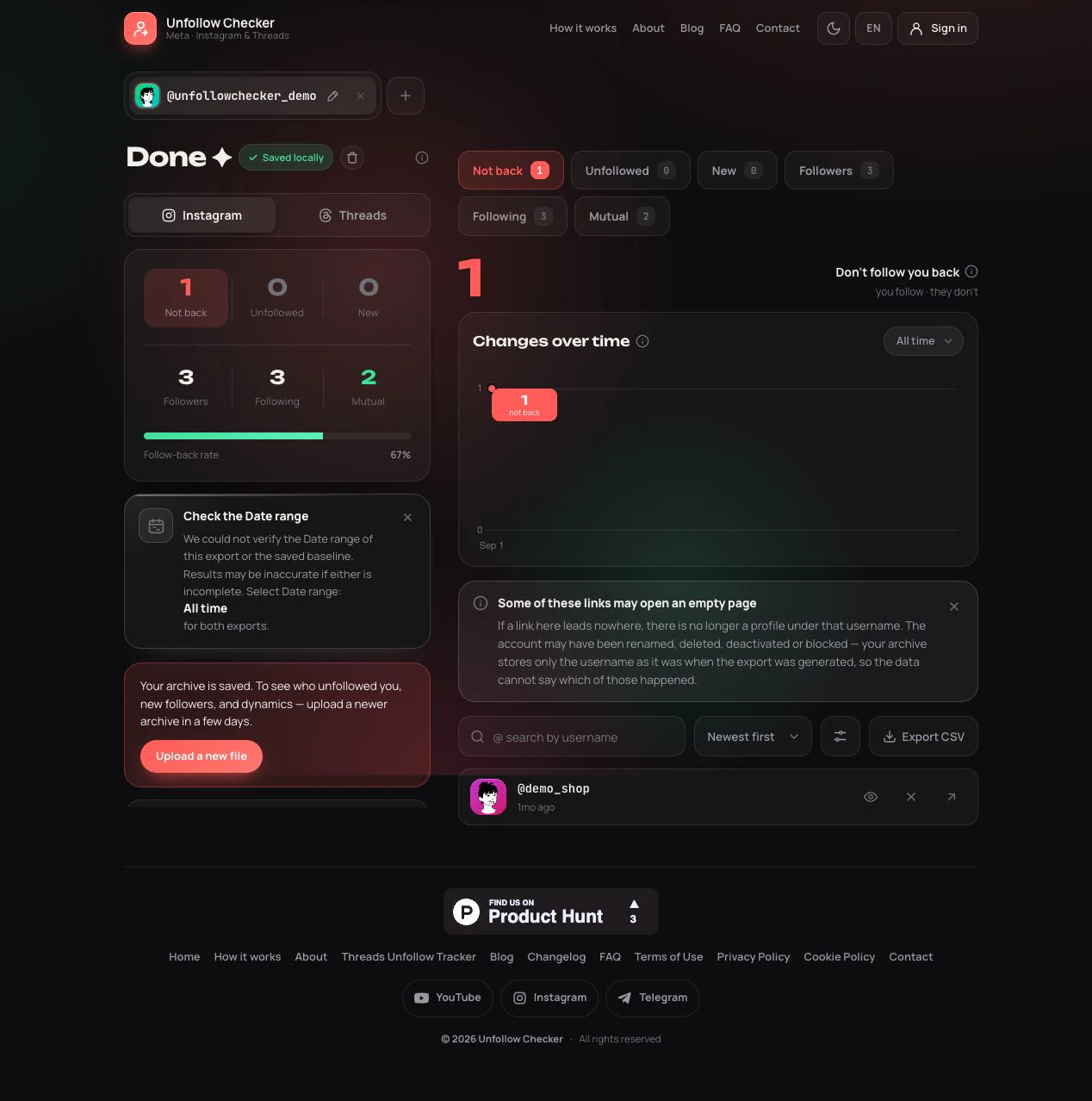
Actual product screenshot using the practice file; the interface is in English. The date-range notice is expected because the synthetic JSON does not declare export coverage. It is a reminder to check completeness in real archives.
For your own account, follow the export instructions and keep all follower-file parts. Privacy details explain the difference between local use and optional account saving.
Read all four relationship states
A non-mutual report becomes easier to interpret when you look at the entire relationship, not just a label. These examples use invented usernames and describe a single snapshot.
| Account | You follow them | They follow you | Interpretation |
|---|---|---|---|
| demo_shop | Yes | No | A non-mutual account you follow |
| demo_mira | Yes | Yes | A mutual relationship |
| demo_alex | No | Yes | A follower you do not follow back |
| demo_none | No | No | Neither relationship is present |
The last row is a conceptual example: someone absent from both exported lists will not appear just because the checker knows their username. The tool works with relationships in your files, not with a directory of all Instagram accounts.
To repeat the check by hand, place the Following usernames in one column and the Followers usernames in another. Start with each name in Following and look for an exact match among Followers. Keep the names with no match: in the practice file, that leaves demo_shop. The count also reconciles: 3 following minus 2 mutual accounts equals 1 account not following back. Reversing the starting column answers a different question and finds demo_alex, whom you do not follow back. Equal totals of three in both original lists therefore do not mean that all three relationships are mutual.
Non-mutual is not the same as unfollowed
This is a present-state check. To investigate whether someone disappeared since an earlier date, you need the separate two-export comparison. A single list cannot establish that history or the reason for a relationship change.
A practical review that keeps useful accounts
The direction matters when you take action. Unfollowing demo_shop removes your subscription to that account. Following demo_alex creates a new subscription. Removing demo_alex as your follower would change the opposite side of the relationship. Decide which outcome you actually want before opening any controls.
After making a change, your existing export remains a historical record. It does not update to reflect a button you pressed in Instagram. Likewise, a handled mark in the checker records your review progress, not a verified unfollow. A later export provides a separate opportunity to check the resulting lists.
Diagnose an unexpectedly long report
If almost every account you follow is marked non-mutual, first check whether the followers information is present at all. Following data without followers data cannot establish reciprocity. Next confirm that both lists belong to the same profile and platform, and that you retained all numbered follower files inside the archive.
Use current usernames when manually checking the results. Display names are not unique, and a remembered name may no longer be the account's handle. The time between export preparation and your manual check also matters: someone may have followed you after the snapshot. A different live result is a reason to check dates, not proof that either observation must be fabricated.
Frequently asked questions
Do I need two exports to find non-mutual accounts?
No. One complete export containing both followers and following is enough for a present-state comparison. Two exports are needed for the separate question of which follower entries changed over time.
Does non-mutual mean they rejected my follow?
No. The lists show the relationship available in that snapshot. They do not explain a person's decision, whether they saw a notification, or whether they previously followed you. Avoid attaching a motive to a set comparison.
Should I follow everyone who follows me?
That is a personal choice. Reciprocity is not a requirement for a useful feed. Review accounts for the content and relationships you want, and use the report to make an informed decision rather than as a score to maximize.