
A Threads unfollow tracker can compare two dated follower lists from your own exports. To build a useful history, save the original files, compare the same profile and platform, and record which dates each result covers. You do not need to share your Threads password for this manual workflow.
Choose the right check before you start
Three questions often get bundled into “Threads followers tracking.” They need different evidence:
| What you want to know | What to use | What you get |
|---|---|---|
| Is my audience growing overall? | Threads Insights, where available | Trends in follower growth and content performance |
| Which usernames are missing since my last check? | Two Threads follower exports | Names present before and absent later |
| Who does not follow me back? | Followers and following in one export | Current non-mutual relationships |
Meta describes follower growth in Threads Insights. For comparing individual names, use your saved lists. If you only need a one-off check, the Threads unfollower walkthrough covers the import itself. This guide focuses on keeping a history you can actually interpret next week or next month.
Set up a repeatable Threads tracking routine
1. Save a clean starting snapshot
Request your information through Meta using the Threads export instructions. Select the relevant Threads profile and follower information; use All time for the requested date range. Instagram followers alone cannot substitute for Threads followers, even if the profiles share a username.
2. Add a genuinely newer export
Choose a schedule that matches your question: for example, a weekly personal review or observations before and after a campaign. That is a planning choice, not a requirement to export every seven days. If Meta has not finished preparing a file, wait for its ready status.
Open Unfollow Checker, import the older ZIP followed by the newer one, and select Threads. Confirm that both belong to the same profile and check the displayed comparison dates. Re-downloading last week's prepared ZIP cannot tell you what happened today.
3. Record the result before changing the baseline
Save the older date, newer date, current follower count, New and Unfollowed counts. Here, “Unfollowed” names a result list: a missing username still needs interpretation. If you export a result to CSV, keep it with the two source archives so you can reproduce the check.
For a consecutive comparison, use a separate browser profile with no saved Unfollow Checker history, stay signed out, and import the previous period's original ZIP followed by the current one. This isolates the chosen pair from your main saved history. For a cumulative view, retain the first snapshot as the baseline. Always check the dates displayed in the result instead of assuming a newer import moved the baseline forward.
Read the result: net growth is not the whole story
Here is an invented three-snapshot review log. It illustrates the arithmetic, not measured performance of a real Threads account.
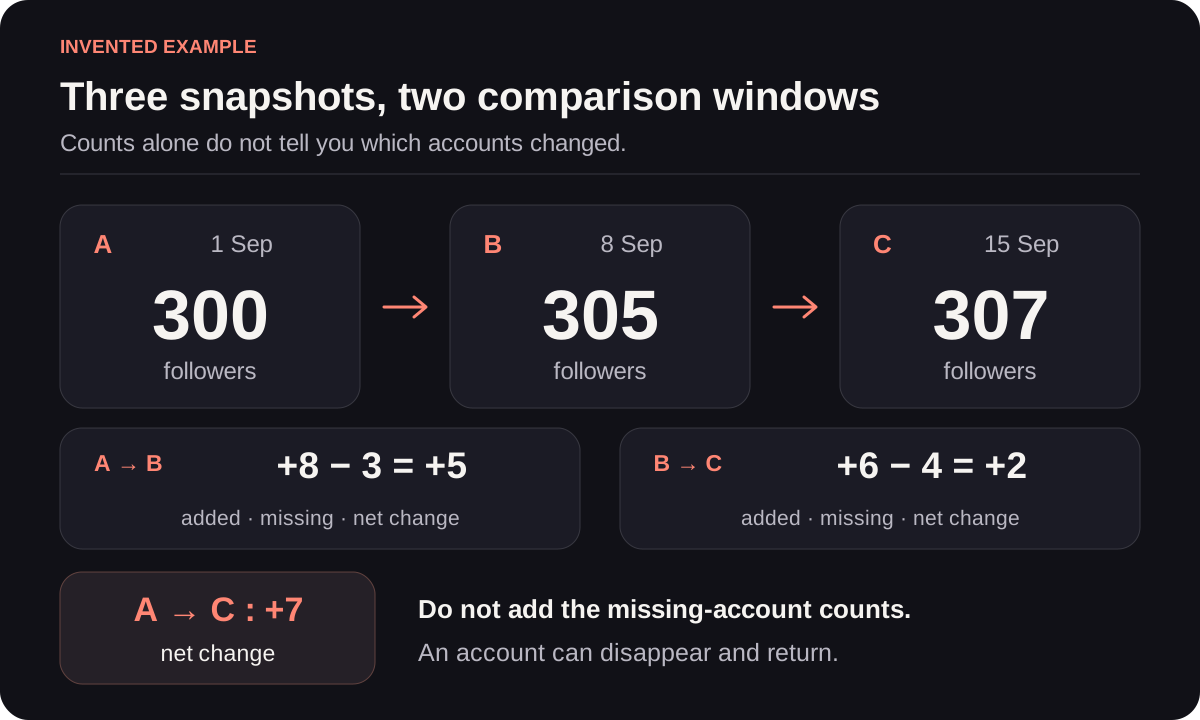
The end-to-end total grows by seven. That does not tell you the number of distinct people missing from the first list.
| Export date | Followers | Compared with | New | Missing | Net change |
|---|---|---|---|---|---|
| 1 September | 300 | Starting point | — | — | — |
| 8 September | 305 | 1 September | 8 | 3 | +5 |
| 15 September | 307 | 8 September | 6 | 4 | +2 |
Copy those columns into your own notes and add the profile, original filenames and any data issue. New minus missing equals the net change for each complete pair of lists. If the arithmetic does not match, check whether the counts come from the same platform and dates.
Why not call the monthly result “seven unfollowers”? Consider a hypothetical reader_a who is present on 1 September, absent on 8 September and back on 15 September. The first weekly report records a disappearance; the second records an addition. An end-to-end comparison finds that name in both lists. Summing weekly missing counts answers a different question from comparing the first and last lists.
Try a small example before using your own archives
Download the 1 September sample ZIP and 8 September sample ZIP. This separate, smaller example contains invented usernames and three Threads followers per snapshot. It is not the 300-follower illustration above and contains no real account data.
Use a separate browser profile or private window, stay signed out, and import the older file before the newer one. Choose Threads. Keep these files separate from your personal export history.
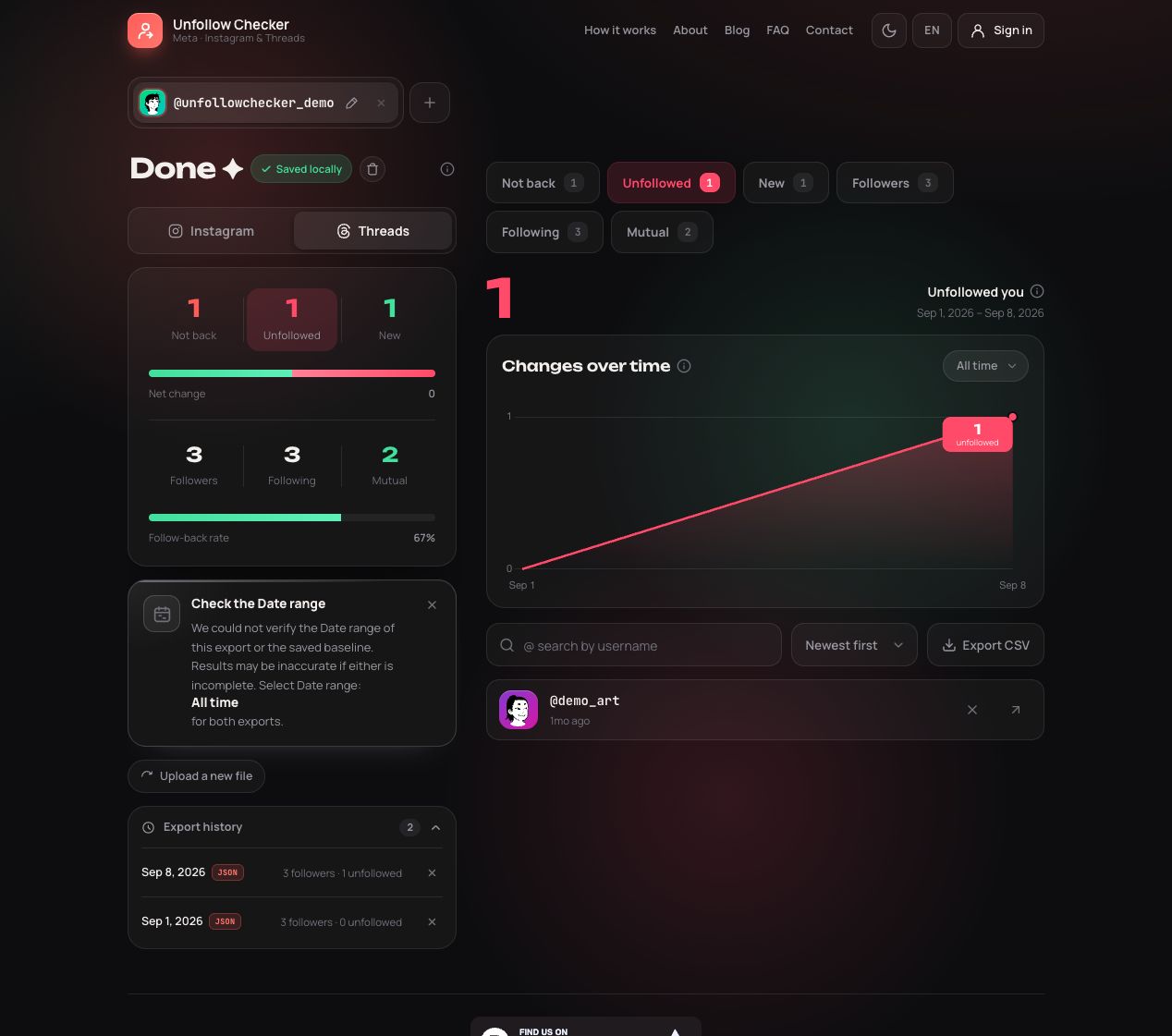
Real product screenshot using synthetic files; the interface is in English. demo_art is missing, demo_design is new, and the total remains three. The date-range warning is expected because these teaching JSON files do not declare export coverage.
Check Unfollowed, then New. You should find the two names described in the caption. Not back contains demo_news, a different relationship check. The full worked comparison lists every input name if you want to verify the output independently. The sample profile names are teaching labels; do not use them to identify real people.
Investigate an unexpected change before acting
When a Threads unfollowers report looks surprising, use the symptom to decide what to inspect:
- Almost everyone appears missing: check the profile, platform and completeness of both exports. A missing Threads section is not an empty follower list.
- One name disappeared and another appeared: a username change is one possible explanation. Check the current profile before interpreting this as two separate people.
- The total stayed the same: inspect both added and missing lists, as in the sample above.
- The comparison dates are wrong: inspect the archive details. A copied file's modification time can be misleading; use a newly requested export when you need a new observation.
- You skipped a week: record the gap. Your next valid comparison covers a longer interval; it cannot reconstruct everything that happened inside it.
For archive problems, the ZIP troubleshooting guide explains split files and snapshot dates. To change who you follow after reviewing the evidence, use the manual Threads cleanup guide.
Keep a history you can recover
Manual ZIP analysis runs in your browser. Without signing in, saved history belongs to that browser; clearing its storage or closing a private session can remove it. Optional account restoration saves extracted lists and results remotely. The privacy policy explains those storage choices.
Keep your own original exports if you want an independent record. A screenshot of a total is useful for a quick note, but it cannot reconstruct the underlying usernames. For a cross-platform review, keep a separate Instagram tracking history.
Frequently asked questions
Is there a free Threads unfollow tracker without a password?
Unfollow Checker's manual workflow compares your official exports without asking for your Threads password. One file establishes a snapshot; a newer file enables a comparison. Meta may require you to sign in on its own website to request the exports.
Can an old ZIP show new Threads unfollowers automatically?
No. A saved file does not update when a relationship changes. This manual workflow needs a newer export and does not provide a live event feed.
Does a missing username prove someone unfollowed me?
No. The comparison establishes that a username is absent from the newer list. Renames, unavailable accounts and incomplete exports can also explain a difference. It does not establish an exact unfollow time or motive.
Should I use a fixed baseline or consecutive comparisons?
Use consecutive comparisons for separate review periods and a fixed baseline for change since a particular starting date. Record both dates with every result and do not add overlapping missing-account totals together as if they counted distinct people.