
To check unfollowers from an Instagram ZIP file, compare the follower list inside an older export with the list inside a newer one. The ZIP does not contain an unfollowers list. It contains the follow relationships that existed at the moment Meta generated it, in JSON or HTML form.
This guide explains what is inside the archive, which files matter, how the two formats differ, and how to turn two exports into a list of missing accounts, either with Unfollow Checker or by hand in a spreadsheet.
What is inside the ZIP
A Meta export is a ZIP archive with a folder for each category you selected. For a follower check, only the connections folder matters. In the current layout, the relevant files live under connections/followers_and_following/:
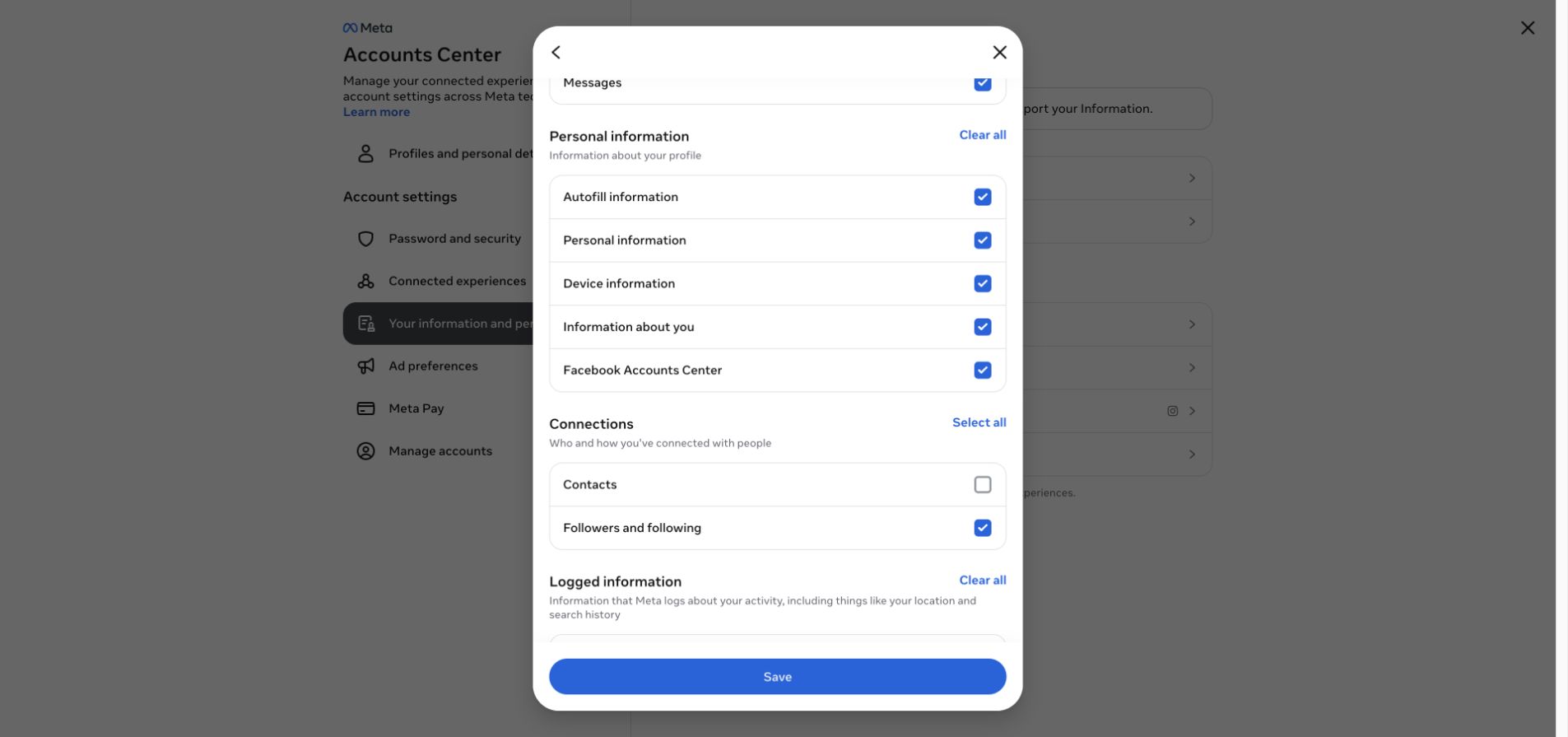
Select Followers and following when you create the export.
| File | What it holds | Notes |
|---|---|---|
followers_1.json |
Accounts that follow you | Large audiences are split into followers_2.json, followers_3.json and so on |
following.json |
Accounts you follow | One file, wrapped in a relationships_following object |
followers_1.html, following.html |
The same lists as readable pages | Present instead of the JSON files when you request the HTML format |
start_here.html |
The export's cover page | HTML format only; carries the generation time |
If you included Threads in an Instagram export, its lists appear under your_instagram_activity/threads/. An export requested from a Threads profile instead places them in a top-level threads/ folder. Some archives place followers_and_following/ at the root without the connections/ prefix. The folder names are clues, not a promise: Meta has changed the layout more than once, so a checker has to accept several variants.
In JSON, every follower is an object with a string_list_data array. The array's first item holds href (the profile link), value (the username) and timestamp. In following.json the username sits in the entry's title field instead, and string_list_data carries only the link and the time. The timestamp is the Unix time when the follow relationship started. Nothing in the archive records when a relationship ended.
JSON or HTML
Meta offers both formats on the Accounts Center export page, and both contain the same follower and following lists. They differ in two practical ways.
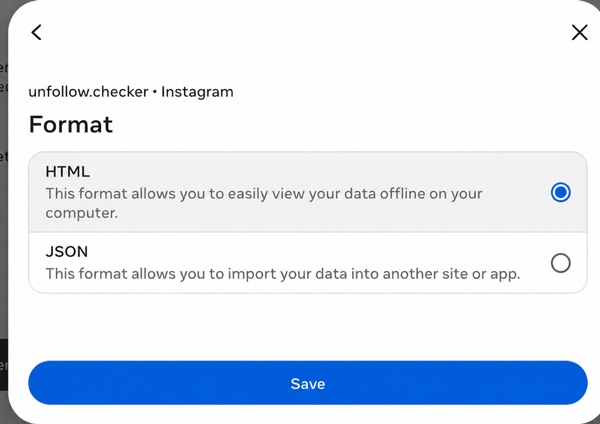
Choose JSON for manual processing or HTML when you want a readable export with an explicit generation stamp.
In supported HTML layouts, start_here.html carries the export time in a machine-readable datetime attribute. Unfollow Checker gives a readable, plausible HTML generation stamp priority. Otherwise it uses the timestamps stored on ZIP entries; if those cannot be read either, it falls back to the original file's modification time. The relationship timestamps inside JSON are not the export's generation time. Keep the original archive: repacking or copying can affect fallback date information.
JSON is the format to pick if you plan to process the lists yourself. Spreadsheets and scripts read it directly, while the HTML pages need to be scraped for profile links first. If you only want a result, either format works in Unfollow Checker. An explicit HTML generation stamp, when available, avoids relying on file timestamps.
Turn two ZIP files into an unfollowers list
The comparison is the same whichever route you take: take every username from the older follower list and check whether it still appears in the newer one.
With Unfollow Checker
- Request and download two exports of the same profile on different dates. The download guide covers the request settings.
- Open Unfollow Checker and add the older ZIP. Do not unzip it; the archive is read in your browser, and the numbered follower parts are merged automatically.
- Add the newer ZIP. The result lists accounts missing from the newer export, accounts added since the older one, and accounts that do not follow you back.
- Check the two dates shown above the result. The checker prefers dates inside the archives and uses the file's modification time as a last resort; renaming a file does not set its snapshot date.
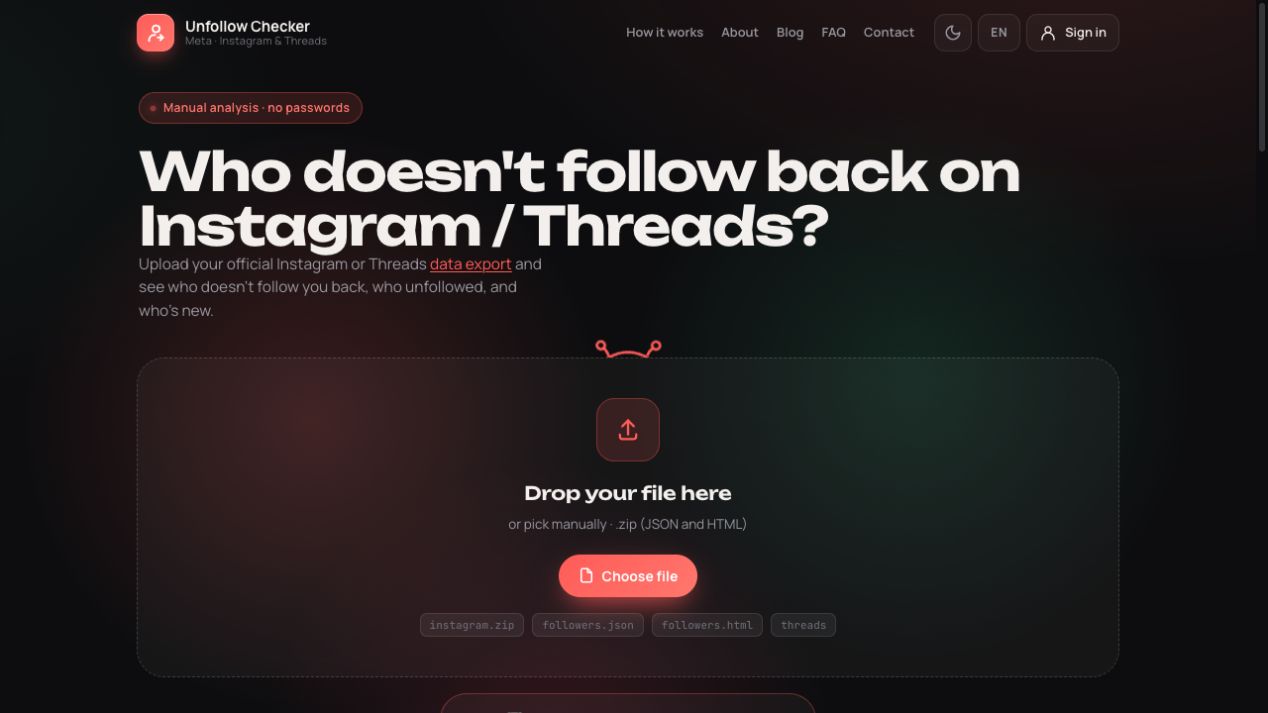
Add the untouched ZIP directly in your browser.
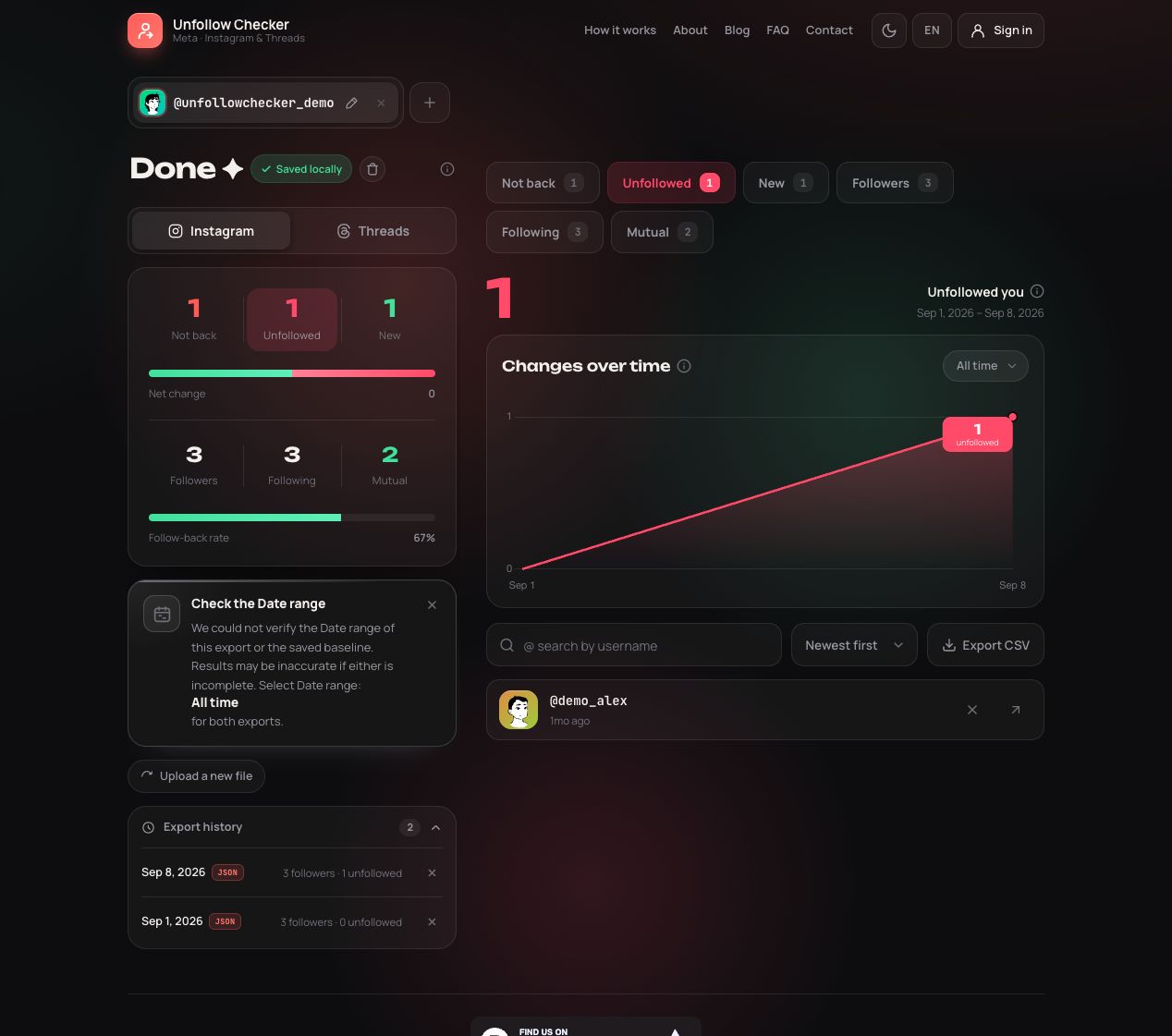
After the second snapshot, open Unfollowed. This screen uses the two synthetic teaching ZIPs linked below, not a real account's data.
In a spreadsheet
- Extract both archives and open every
followers_*.jsonfile from each export in a text editor. - Copy each
valuefield into a column: older export in column A, newer export in column B. Copy usernames, not display names, and include every numbered part. - In column C next to each older username, enter
=IF(COUNTIF(B:B, A2)=0, "missing", "")and fill it down. Every row marked missing is an account that was in the older list and is not in the newer one. - Reverse the columns to find accounts that were added.
Here is a hypothetical example. The older export lists river.k, noor_art, tomas.b and jae_lens. The newer one lists noor_art, tomas.b, jae_lens and pilar_v.
| Username | Older export | Newer export | What the comparison shows |
|---|---|---|---|
| river.k | Present | Absent | Missing from the newer list |
| noor_art | Present | Present | No change |
| tomas.b | Present | Present | No change |
| jae_lens | Present | Present | No change |
| pilar_v | Absent | Present | Added since the older export |
Both files contain four followers, so the total did not move at all. Only a name-by-name comparison reveals that one account left and another arrived.
Mistakes that produce a wrong list
Comparing one part of a split export. If the newer export has followers_1.json and followers_2.json but you only copied the first part, accounts present in the older list and omitted from the newer one can falsely look like unfollowers. Missing parts of the older export can instead hide departures or make existing followers look new. Merge every numbered file in both exports before comparing.
Re-downloading an old export. Downloading or renaming an older archive does not update its follower lists. A different filename is not evidence of a fresh snapshot. Compare the dates shown in the results and request a new export when you need a later observation.
Mixing platforms or profiles. An Instagram follower list compared with a Threads list, or a personal profile compared with a business profile, produces differences that have nothing to do with unfollows. Keep each profile and platform in its own pair of files.
Reading the timestamp as an unfollow date. The time next to a username says when that person started following you. Sorting missing accounts by it does not tell you who left first. What you know is the window between the two exports.
Treating every missing name as intentional. A username can disappear because the person renamed the account, deactivated it, was suspended, or blocked you. Before drawing a conclusion about one person, open the current profile and check. The comparison guide walks through that manual review.
A reproducible incomplete-file check
Use the older teaching ZIP and newer teaching ZIP, which contain invented names rather than real account data. The Instagram walkthrough explains how to import them in a separate browser profile or private window while signed out. Do not mix them with your real exports.
With both archives intact, the Instagram comparison should find only demo_alex missing and demo_lee new. demo_sam is present in the second numbered follower file of both exports. This makes the impact of a skipped part easy to check:
| Lists used in the comparison | Missing names | New names | Interpretation |
|---|---|---|---|
| Both complete | demo_alex | demo_lee | Expected result |
| Newer list without its second part | demo_alex, demo_sam | demo_lee | demo_sam is a false missing entry |
| Older list without its second part | demo_alex | demo_lee, demo_sam | demo_sam is a false new entry |
You can verify the table by copying the names into two spreadsheet columns. There is no need to damage or upload a modified archive: omit demo_sam from one column at a time. The complete files contain three followers each, and the second part supplies one of those three. Automated checks of these exact downloadable files reproduced all three cases on 20 September 2026.
Diagnose the symptom before requesting another export
| What you see | What to check first | Next action |
|---|---|---|
| JSON or HTML file is rejected before import | Is it an extracted file rather than a ZIP? | Select the original ZIP; do not just rename the extension |
| ZIP cannot be read | Did the download finish, and can your archive app open a copy? | Download again; preserve the original error text |
| No followers or no Threads section | Correct profile and selected categories | Request the missing information; absence is not zero followers |
| Many unexpected missing names | Newer list completeness, platform, profile and dates | Check every numbered follower part before acting |
| “Same export” or an ordering warning | Dates inside the exports, not just download names | Obtain a genuinely newer export of the same profile |
| Profile count differs from the file | Snapshot timing and completeness | Compare the same observation period; do not edit lists to fit a live count |
For support, describe the symptom, selected platform, archive format, comparison dates and redacted filenames. For example: “Instagram, JSON ZIP, two numbered follower files in each archive; the second import reports the same date.” That is more useful than “the checker is wrong” and avoids sending other people's usernames or your entire account export unnecessarily.
Keep the archive private
The ZIP is personal data twice over: it describes your account, and it lists other people's usernames. Keep the original file, store it where only you can read it, and delete any extracted copies you no longer need. Unfollow Checker parses the archive in your browser and does not upload it; if you sign in to keep results across devices, the extracted lists are stored in your account as described in the Privacy Policy. If you ask someone for help with a file that will not import, start with the error message and the list of filenames, not the archive itself.
One export also answers a different question. Comparing following.json with the follower files inside the same archive shows who does not follow you back right now, without any older file. For repeated checks, the tracking guide explains how to keep dated exports so every comparison has a clear start and end.
Frequently asked questions
Can I upload a single JSON file instead of the ZIP?
Unfollow Checker reads the ZIP archive as Meta delivers it. Uploading one extracted followers file on its own is not supported, and it would also skip the other numbered parts of a split export. Keep the archive intact and add the whole file.
Does one ZIP show who unfollowed me?
No. A single export is a snapshot of who follows you at the time it was generated. It cannot list people who followed you before that and left. Save it as a baseline and compare a newer export against it later.
Is the HTML export the same data as the JSON export?
Both formats provide follower and following lists for the categories you selected. A supported HTML cover page can provide an explicit generation time; when that stamp is absent or unreadable, the checker uses its fallback date sources. JSON is easier to process in a spreadsheet or script.
Why does the checker say my new file is the same export?
The checker found the same snapshot date as a saved export. That is a date check, not proof that every byte is identical. Re-downloading an old prepared archive does not create a new observation. Check the export details and request a newer export.