
To investigate a missing Threads follower, compare two Threads follower lists for the same profile. Instagram follower data alone cannot establish what changed on Threads.
Check that the export contains Threads
Follow the export guide and inspect which profile and information you selected. Depending on the export, Threads may be included in an archive or supplied separately. The presence of Instagram files does not by itself confirm the presence of Threads connections.
Avoid the missing-section trap
If Unfollow Checker reports no Threads data, correct the export selection before comparing. An absent section must not be treated as an empty list, or every old entry would falsely look like a departure.
Compare like with like
Use the older Threads file as the starting snapshot and then add a newer one. Confirm the active profile, Threads view, and comparison dates. Names found only in the older list are missing from the newer snapshot; names found only in the newer one are additions.
That observation does not prove why an account disappeared. Check for username changes, unavailable profiles, blocking, or incomplete files. You know the interval between snapshots, not the exact moment of an unfollow. With only one export, keep it for a future comparison.
Keep relationship checks separate
Comparing following with followers in one Threads export identifies accounts that do not currently follow back. It says nothing about whether they followed previously.
For repeated comparisons and baseline choices, use the Threads tracker guide. The archive is parsed on your device; optional sign-in saves extracted lists and results in the cloud. Review privacy settings and deletion before using cross-device restoration.
Reproduce a Threads comparison without your private data
Download the 1 September teaching ZIP and the 8 September teaching ZIP. These small synthetic archives contain separate Instagram and Threads lists for the invented profile unfollowchecker_demo. They are not real Meta exports or evidence about real people. A real Instagram export does not necessarily include Threads just because this example does.
Use a private window or a separate browser profile, stay signed out, and keep the examples separate from your own history. Import the older file into Unfollow Checker, then the newer one, and choose Threads. If you already imported this pair for the Instagram guide in that same separate browser session, switch platforms instead of adding them again.
The expected Threads result is 3 followers, 3 following, 1 Unfollowed (demo_art), 1 New (demo_design), and 1 Not back (demo_news). The last category compares following with followers in the newer snapshot; it does not use the older follower list.
These teaching JSON files do not declare their requested date range, so Check the Date range remains visible. The table below documents their complete invented lists. For real exports, verify All time in Meta and investigate incomplete data. Do not follow the example usernames' profile links to look for real people.
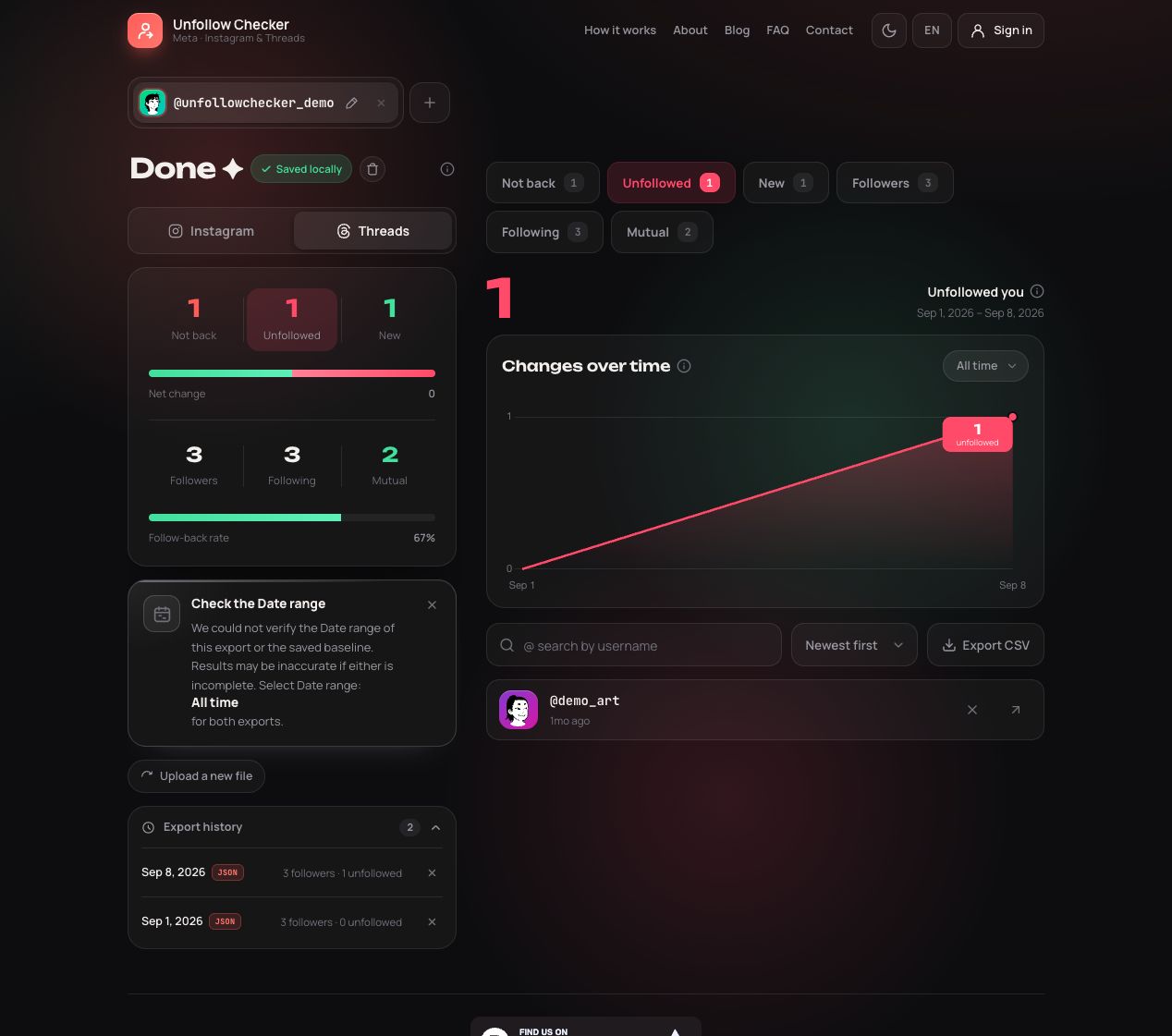
Actual Threads result from the linked synthetic inputs. The comparison window is 1–8 September 2026.
| Username | Older Threads followers | Newer Threads followers | What to expect |
|---|---|---|---|
| demo_art | Present | Absent | Missing from the newer list |
| demo_books | Present | Present | Unchanged |
| demo_city | Present | Present | Unchanged |
| demo_design | Absent | Present | New |
| demo_news | Absent | Absent | Not back: present in following |
For an independent check, open copies of the files and look under your_instagram_activity/threads/. In this example, followers.json holds the follower list in text_post_app_text_post_app_followers; following.json uses text_post_app_text_post_app_following. The Instagram lists under connections/followers_and_following/ contain different names. Do not substitute them for the Threads data.
Packaging can vary, so use the original ZIP and check the available result sections. Folder names are clues, not a universal guarantee that every export follows the same layout. If a file cannot be read, preserve the original and report the error with redacted structural details rather than manually deleting unfamiliar sections until it imports.
The totals remain three despite the changed names. A renamed account could also appear as one missing name plus one new name in a real comparison. The output identifies a difference to investigate, not its cause.
Automated checks run on 20 September 2026 reproduce these results with the downloadable files and the site's parsing and comparison logic. They check this fixture, not universal support for every past or future Threads format.
Check timing and account identity
Use two observations that belong to the same Threads profile. Save the request details and download date, and distinguish them from a copied file's modification time. Moving an archive to another folder changes neither the historical relationships it contains nor the period you can investigate.
Frequently asked questions
Is an Instagram export enough to check Threads?
Only if the relevant Threads relationship data is actually included and supported. The presence of Instagram followers is not sufficient. Check the selected information and the Threads result section before comparing.
Why do Instagram and Threads show different non-mutual accounts?
They describe separate follow relationships. A person can follow you on one platform without following you on the other. Compare each platform's own lists instead of treating a shared handle as evidence of the same relationship.
Can I learn the exact moment a Threads account disappeared?
Two exports show a difference between observations. They do not supply an unfollow event timestamp. Use the comparison window and verify important identities rather than assigning an exact departure time.