
To check for Instagram unfollows, compare an older follower list with a newer one. A current list alone cannot reconstruct who followed you before you started keeping records.
Checking one account manually
Open your profile's Followers list and search for the current username. If it is missing, the account does not appear in that list now. Before drawing a conclusion, check for a changed username, an unavailable profile, or a block. Memory of a past follow is weaker evidence than a saved list.
Comparing two exports
Use the download instructions to obtain comparable exports for the same Instagram profile. Keep the older file and open it in Unfollow Checker before adding the newer one. Check the comparison dates shown in the results.
Reading the result correctly
- A missing entry is a possible unfollow, not proof of the person's intent. Account deletion, deactivation, blocking, username changes, or incomplete exports can affect the result.
- Two snapshots establish an observation window, not an exact unfollow time. An account that follows and leaves between exports may be invisible in both.
- Not following back is a different comparison: following versus followers within one export.
The ZIP is parsed in your browser. You can use the tool without an account; optional sign-in saves follower lists and results to the cloud. Review data handling before enabling that option. For repeated checks, use the tracking workflow.
Try the comparison with two downloadable files
You can reproduce this result without exporting your own account. Download the older teaching ZIP — 1 September 2026 and newer teaching ZIP — 8 September 2026. Each is about 2.4 KB. These are synthetic, Meta-style JSON archives created for this guide, not exports from a real Instagram account. All usernames and dates are invented.
Use a separate browser profile or a private window, stay signed out, and do not mix the teaching files with your own saved exports. This keeps the demonstration out of your real comparison history.
The example JSON files do not declare the requested date range, so the interface shows Check the Date range. This is expected here; the complete invented lists are documented below. For your own exports, verify All time in Meta rather than assuming an unknown range is complete. The names are teaching labels: do not use their profile links to identify real people.
- Open Unfollow Checker and add the 1 September ZIP without unpacking it.
- Choose Instagram. The first file supplies a baseline: 3 followers, 3 following, and 1 Not back account,
demo_shop. It cannot establish past unfollows. - Add the 8 September ZIP for the same teaching profile,
unfollowchecker_demo. - Check the comparison dates. Open Unfollowed: expect 1,
demo_alex. Open New: expect 1,demo_lee. - Open Not back again: it still contains only
demo_shop. A non-mutual account and a missing follower answer different questions.
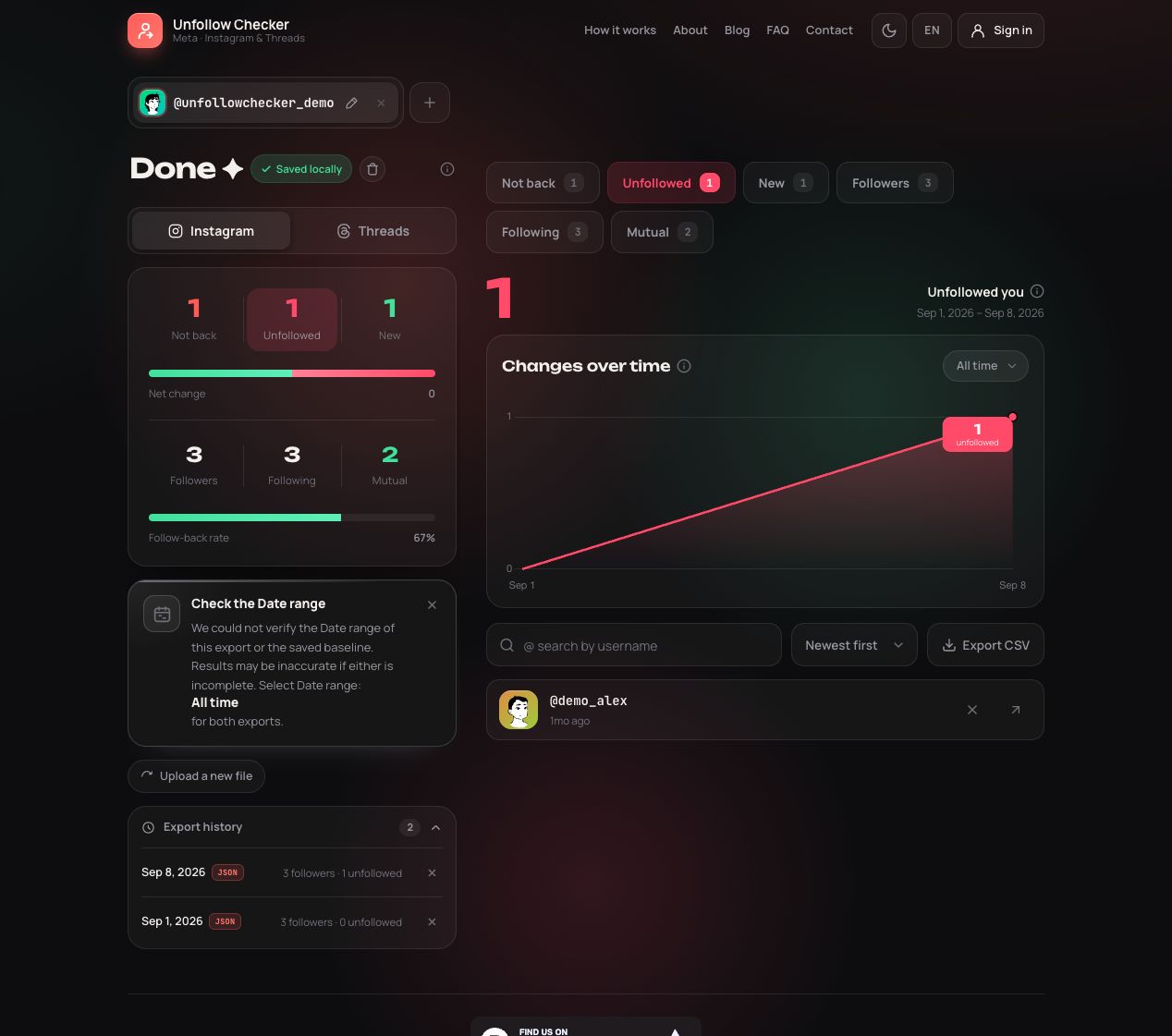
Actual product screen with the linked teaching files and English interface labels.
| Username | 1 September followers | 8 September followers | Result |
|---|---|---|---|
| demo_alex | Present | Absent | Unfollowed: missing from the newer list |
| demo_mira | Present | Present | Unchanged |
| demo_sam | Present | Present | Unchanged; stored in the second numbered file |
| demo_lee | Absent | Present | New |
| demo_shop | Absent | Absent | Not back, because it appears in following |
Both follower totals are three. The unchanged count hides one removal and one addition. To check independently, open a copy of each ZIP and combine followers_1.json with followers_2.json; compare the value fields. Keep the originals intact for importing.
The ZIP troubleshooting guide uses these same files to show how an omitted follower-file part creates a false result.
These downloadable inputs and their expected results are covered by automated checks of the site's parser and comparison logic, run on 20 September 2026. This verifies the example, not every possible Meta export layout.
Troubleshoot a surprisingly large missing list
Check the inputs before acting on a result that says half your audience disappeared. First confirm that the two exports belong to the same profile. Personal and business accounts can have similar names, and the file's download name is not enough to identify its owner. Next check that both comparisons use Instagram rather than mixing an Instagram list with a Threads list.
Follower data may be split into numbered files. Comparing only followers_1.json from a large export with a complete older list makes everyone in the omitted files look missing. Use the original ZIP with all its connection files rather than selecting a single convenient file from inside it. An unreadable archive also calls for a new download, not a conclusion about your audience. The ZIP file guide shows which files hold the lists and how to merge the parts.
Finally, check the age of both exports. Downloading an old prepared archive today does not turn it into a fresh observation. Preserve the export details and the original file; do not infer a capture time from the moment you copied it to another folder.
Frequently asked questions
Can I recover unfollows from before my first export?
A current export cannot recreate an older list that you did not save. Earlier screenshots or records may help with a specific account, but they can be incomplete. Save a baseline now to make your next comparison meaningful.
Does a timestamp beside a username tell me when they left?
No. A relationship timestamp in an export is not an unfollow event. Sorting missing accounts by a saved timestamp does not establish the order in which they disappeared. Report the comparison window rather than an invented departure time.
What should I save after checking?
Keep the two original exports, the profile and platform, and a short note identifying which dates you compared. If you need to discuss an error with support, start with the error message and file structure rather than sending an archive containing other people's information.